Preload As Fetch, In Practice
Introduction
You add <link rel="preload" as="fetch"> to your HTML, expecting data fetches to start earlier and finish faster.
You test it — and the browser sends two requests instead of reusing the preload. The data arrives no sooner than if you hadn’t preloaded at all.
Getting preloading right is tricky. The <link> tag and fetch() use different knobs to control the same request behaviour,
and the two need to match. In this article, I break down which option combinations work, which don’t, and where browsers disagree.
Table of contents
- Introduction
- Table of contents
- How preloading works
- How to correctly preload data fetches
- Are preloads reused for fetches with custom headers
- Conclusion
How preloading works
The following code snippets show how to preload a resource using a link tag.
<!DOCTYPE html>
<html>
    <head>
        <link rel="preload" as="fetch" href="./resource" />
        <script src="./script.js"></script>
    </head>
    <body></body>
</html>
/* script.js */
const response = await fetch('./resource', { mode: 'no-cors', credentials: 'include' });
/* Do something with response */When the browser sees the link tag, it starts fetching the resource. This helps start data loading before the script that needs it has loaded. Later, when some JavaScript fetches the same data, the browser can reuse the preload response if already ready (figure: Early preload response) or wait for it to finish if not (figure: Late preload response).
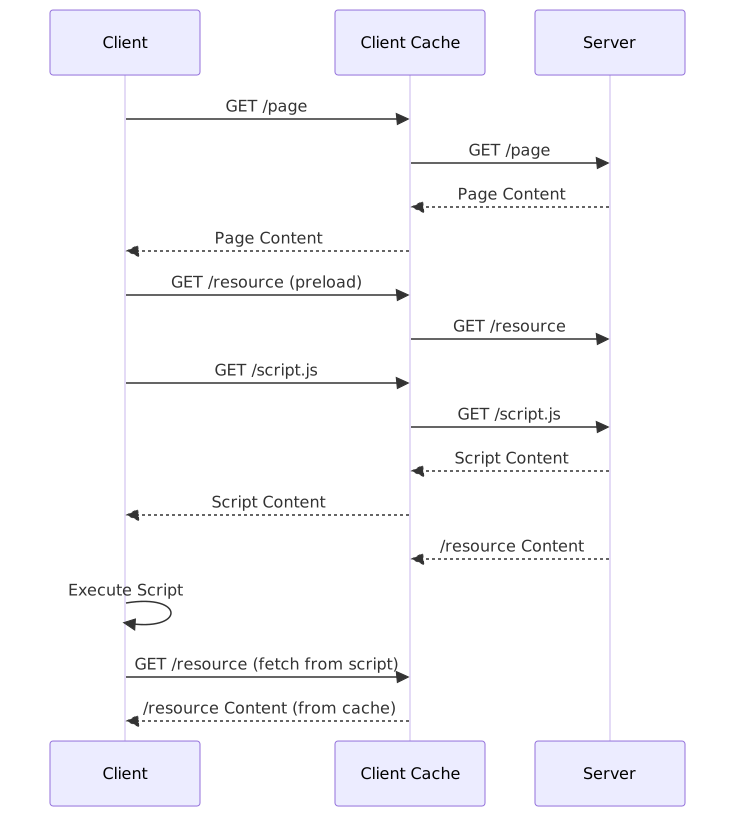
Early preload response: In this example, the browser receives the response to the preloaded resource before the script attempts fetching it. The browser keeps the response in its cache and reuses it once the script requests it.
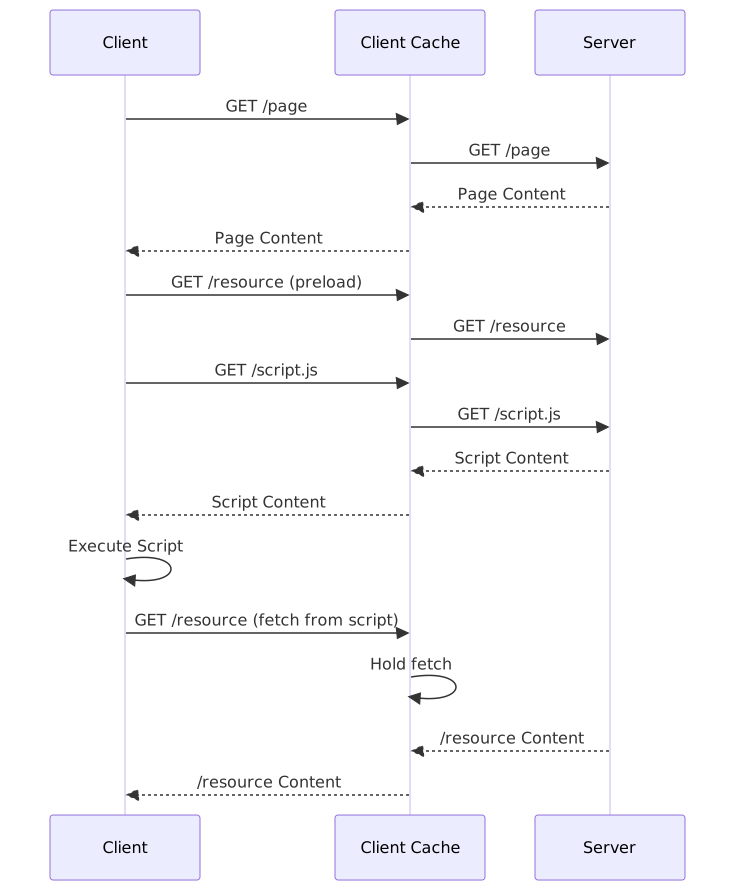
Late preload response: In this example, the script attempts fetching the resource before a response is received for the preloading fetch. The browser does not send a second request. Instead, it holds the second fetch until the preloading response is received, reusing it.
How to correctly preload data fetches
When we preload data using link tags, we want the browser to reuse the response to our preload on later fetches. For that to work, the preloading fetch and the fetch done by the JavaScript code have to have matching options, so that the browser considers them as the same request.
Fetch options
Two fetch() options — mode and credentials — determine whether the browser treats a subsequent request as matching the preload:
-
fetchsupports 3 modes:same-origin, which disallows cross-origin requests. We won’t revisit it since<link rel="preload">never uses this mode.no-corsstrips custom headers from all requests. For cross-origin requests, it also returns an opaque response that JavaScript cannot read.cors(for Cross-Origin Resource Sharing), the default mode.- Cross-origin requests use the CORS mechanism.
- Same-origin requests work normally and allow custom headers.
-
fetchalso accepts 3 possible values for the credentials parameter:same-origin(default) only sends credentials for same-origin requests.includealways sends credentials.omitnever sends credentials.
Preload options
Preload link tags for data fetches have the following form, accepting an optional crossorigin attribute:
<link rel="preload" as="fetch" href="URL-of-data" crossorigin="use-credentials|anonymous" /><link rel="preload">accepts 3 possible values for the crossorigin attribute:- (none), that is, when the attribute
crossoriginis not passed.- The browser fetches the
hrefURL with modeno-cors. - Credentials (cookies) are always sent for same-origin and for cross-origin URLs (
credentials='include').
- The browser fetches the
use-credentials:- The browser fetches URL with mode
cors. - Credentials (cookies) are always sent (
credentials='include').
- The browser fetches URL with mode
anonymous:- The browser fetches URL with mode
cors. - Credentials are never sent (
credentials='omit').
- The browser fetches URL with mode
- (none), that is, when the attribute
If the value given for the crossorigin attribute is an invalid keyword or an empty string, it will be handled as crossorigin="anonymous".
Notice also that <link rel="preload"> does not have a way to send requests with mode=no-cors and credentials=omit.
Now that we’ve seen both sides — the fetch() options and the <link> attributes — the question is: which combinations actually work? I ran experiments to find out.
Passing the right options to allow fetch to reuse preloaded responses
In the repo preload-as-fetch-experiments, I conducted two experiments
to find out when browsers are able to reuse <link rel="preload" as="fetch"> data by later fetch()s.
Experiment 1 includes a matrix
showing which combinations of <link rel="preload"> and fetch() options allow preloaded data to be reliably reused across browsers.
The results show that preloaded data is reused when the following elements are consistent with each other:
- The preloaded URL’s origin (same-origin or cross-origin) must match the mode implied by the
<link>tag’scrossoriginattribute and align withfetch()’smode. - The
<link>tag’scrossoriginattribute must match thecredentialsoption passed tofetch().
I derived the following rules:
- When the preloaded URL is from the same origin:
- Do not pass the
crossoriginattribute to<link rel="preload">. - Explicitly pass
mode: "no-cors"tofetch(sincecorsis the default mode). - Explicitly pass
credentials: "include"tofetch.
- Do not pass the
- When the preloaded URL is from a different origin:
- Always pass the
crossoriginattribute. - If you want to include credentials, you must pass
credentials: "include"tofetch. - If you don’t want to include credentials, leave
fetch’scredentialsoption to its default value.
- Always pass the
If you stray from these rules, some combinations might still work — but not reliably across all browsers:
- When the preloaded URL is from the same origin:
- Safari never reuses same-origin preloads when
crossoriginattribute is specified, whereas Firefox and Chrome sometimes reuse them and sometimes do not, in ways inconsistent with each other. - Leaving
credentialsto its default value works in Firefox and Safari but not in Chrome (which will not reuse the preload).
- Safari never reuses same-origin preloads when
- When the preloaded URL is from a different origin:
- Passing
credentials: "omit"explicitly works in Firefox and Safari but not in Chrome (which will not reuse the preload).
- Passing
To make things concrete, here are the three combinations that work reliably across Chrome, Firefox, and Safari:
Same-origin requests
<link rel="preload" as="fetch" href="URL" />
<script>
    fetch("URL", { mode: "no-cors", credentials: "include" });
</script>
Cross-origin requests with credentials
<link rel="preload" as="fetch" href="URL" crossorigin="use-credentials" />
<script>
    fetch("URL", { mode: "cors", credentials: "include" });
</script>
Cross-origin requests without credentials
<link rel="preload" as="fetch" href="URL" crossorigin="anonymous" />
<script>
    fetch("URL", { mode: "cors" });
</script>
These three cover the standard case — no custom headers. But what happens when your fetch() sends custom request headers?
Are preloads reused for fetches with custom headers
In experiment 2, I tested
if the browser reuses preloaded data when handling a fetch() which sends custom request headers.
Since we cannot specify custom request headers when using <link rel="preload" as="fetch">, you would expect the following
fetch() with custom headers to trigger a new request, but testing showed a more complicated picture.
- Chrome always reuses the preloaded data. If the preloading is in progress when the
fetch()is triggered, Chrome waits for it to finish and reuses its response. - Firefox reuses preloaded data if it is cacheable. If the preloading is in progress when the
fetch()is triggered, Firefox waits for it to finish.- If the preload response is cacheable, it is reused by the
fetch(), completing the request sooner than if a second request were sent. - If the preload response is not cacheable, the browser sends a second separate request, completing later than if it had not waited for the preload.
- If the preload response is cacheable, it is reused by the
- Safari ignores the preload (whether finished or in progress) and sends a separate HTTP request for the
fetch().
Safari’s behavior is restrictive but always correct: a fetch with custom headers is never considered the same request as a preload with standard headers. Chrome’s behavior can lead to showing the wrong data if the server response is different based on request headers. As for Firefox, it lets the server decide whether the preloading response is cached or not. Since Firefox relies on explicit server response headers, its reuse of preloads is less error-prone than Chrome’s.
Conclusion
Preloading fetch data can be tricky. In this article, I documented the narrow set of options that allow you to do it reliably across Chrome, Firefox, and Safari.
To summarize the key takeaways:
- Same-origin requests: Omit the
crossoriginattribute and usemode: "no-cors"withcredentials: "include"infetch(). - Cross-origin with credentials: Use
crossorigin="use-credentials"andmode: "cors"withcredentials: "include". - Cross-origin without credentials: Use
crossorigin="anonymous"andmode: "cors"(default credentials).
When custom request headers are involved, browser behavior diverges significantly:
- Chrome always reuses preloads, even when
fetch()sends different headers — convenient but can serve incorrect data. - Safari never reuses preloads for
fetch()calls with custom headers — restrictive but always correct. - Firefox takes a middle ground: it reuses preloads when the response is cacheable and sends a new request otherwise.
I observed these behaviors when implementing the pattern “SSR Publicly Cacheable Content And Preload Dynamic Content” using TanStack Start and SolidStart’s server functions, which typically send custom request headers.
The code used to derive the findings of this article is available in the preload-as-fetch-experiments repository.